 CaptureXRecCaptureXRec
For teams that have to document what happened
In plain words: you tell CaptureXRec when to take a screenshot, and it does so by itself and stores the result safely. Point a rule at an app, a time window, a schedule, or a hotkey, and CaptureXRec takes the shot without anyone reaching for the widget. Four trigger types cover the cases that matter: an app coming to the front, an app launching, an interval on the clock, or a global hotkey pressed on purpose.
Rule-driven still captures come out with auto-blur already burned into the pixels — not a layer over the top, and not a setting a rule author can switch off. Auto-blur detection is a strong best-effort safeguard, not a guarantee, so what it catches is thorough but not infallible. There is no clear copy on disk to leak later. Video clips are the exception and are labelled as such in the builder, so nobody stores one by accident.
Rule output never goes to the normal library. It goes to a separate vault: AES-256-GCM at rest, keys wrapped with an Argon2id-derived key from your admin passphrase, and entries that can only ever be appended. Nothing in the vault can be edited or deleted in place — corrections are new entries.
Every vault entry and every admin action is hash-chained and signed on the device. Run Verify integrity and you get a straight answer: the chain is intact, or here is the exact entry where it broke. Views, exports and purges all append their own audit record.
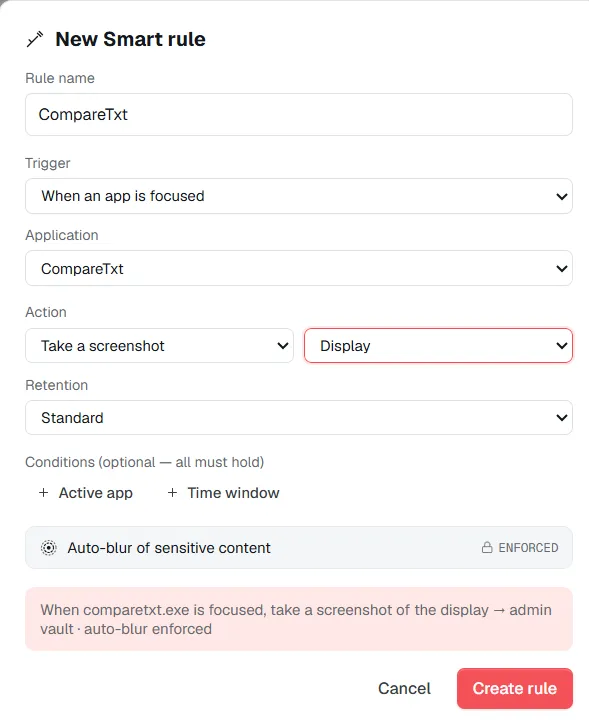
Set a trigger, an action and a retention class once — the rule runs on its own and every capture lands straight in the vault.
Admin mode is off until you set it up. Setup takes an admin passphrase and hands back a one-time recovery code — shown once, never stored in the clear. Everything behind Admin stays locked until that passphrase is entered.
Name it, pick the trigger, pick the action — single shot, a burst, a clip — and pick a retention class. Add optional conditions (active app is, time window) that all have to hold before it fires. The builder summarises the finished rule as a sentence so there's no guessing what it does. A rule is a trigger, an action, and a retention class — set it once and the capture happens without anyone in the loop.
The first time rules go live, a consent acknowledgement appears and is recorded. While any rule is enabled, an floating indicator stays on screen — its label and position are configurable, but its presence isn't.
Browse the vault with the full provenance of every entry — rule, user, workstation, app, type, timestamp, size, retention. Verify the chain on demand. Export selected entries to a folder, decrypted. Expired Short and Standard entries are purged on a sweep; Legal-hold never is.
Supported on
Windows 10 (1809+) · Windows 11 · x64 · ARM64
No — that's designed out. Rules going live requires a one-time consent acknowledgement on the machine, and while any rule is enabled a persistent floating indicator stays on screen. You can move it and relabel it; you can't run rules without it.
Not for still captures. Auto-blur is forced on for every rule-driven shot and burst, and it's burned into the source pixels, so there is no un-blurred copy for anyone — including whoever wrote the rule — to recover. Video clips are the one case blur can't be applied per frame, and the rule builder says so plainly before you save one.
They can't, and the attempt shows. The vault is append-only and every entry is chained to the one before it and signed on the device. Verify integrity walks the whole chain and names the exact sequence number where anything was inserted, removed or altered.
Setup issues a one-time recovery code that unwraps the same vault key. It's shown once and never stored in cleartext, so it needs to go somewhere safe at setup — lose both the passphrase and the code and the vault stays sealed.
No. There is no account, no server and no network path in the feature at all. The vault, the keys, the rule definitions and the audit log are files on the machine, and the app carries no telemetry.
You choose per rule: Short (30 days), Standard (1 year), or Legal hold (indefinite). Expired Short and Standard entries have their media purged automatically — the ledger row is tombstoned so the chain stays intact, and the purge itself is written to the audit log. Legal hold is never auto-purged.
$12.49, once.
Buy on Microsoft Store — $12.49