 CaptureXRecCaptureXRec
Built for gameplay capture
When a game runs full screen, choose the full-screen source to record the entire display, with nothing cut off at the edges.
Game sound and your voice are separate switches. Turn either one on or off without changing the other.
Recording uses hardware-accelerated H.264 encoding, so your graphics card helps with the work while the game runs, instead of leaving it all to the processor.
The floating widget you use to start and stop recording is left out of the video, so the clip never shows the button you clicked.
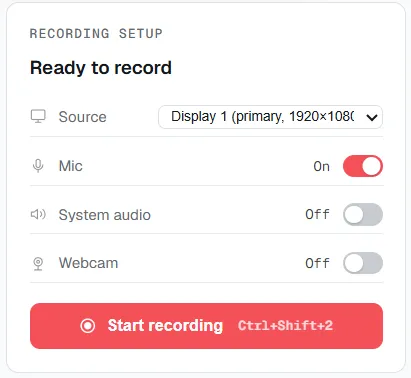
Full screen as the source, the two sound switches set independently, and the camera switch — all set before you press record.
Record the whole display instead of one window, so nothing at the edge is cut off.
Turn on system audio to record the game sound. Turn on the microphone separately if you want to talk over it.
The webcam has its own switch, separate from the audio switches.
Press record. The video is saved as MP4 (H.264 video, AAC audio), and your graphics card helps with the encoding.
Supported on
Windows 10 (1809+) · Windows 11 · x64 · ARM64
Yes — the full-screen capture source takes the entire display, which is what a full-screen session occupies.
Yes — system audio and the microphone are independent switches, so either can be set without changing the other.
Yes. Recording uses hardware-accelerated H.264 encoding, so your graphics card helps with the work.
No — the floating widget excludes itself from every capture and recording it makes, so it never appears in the result.
MP4 (H.264 video, AAC audio). It is a standard format that plays in any common player without converting.
$12.49, once.
Buy on Microsoft Store — $12.49